When I first learned about GPU programming with CUDA I was very confused with certain terms like kernels, thread blocks, and grids, or even just how does code run on the GPU.
In this article we'll go through the fundamentals of CUDA and write code that runs on GPU. We'll use Google Colab to run our code, but of course you can use your own CUDA device if you have one.
CUDA In Google Colab
To run GPU code, you must have the CUDA libraries installed. Google Colab gives you everything out of the box for free.
Create a new notebook in Google Colab and change the runtime using the top-right menu:
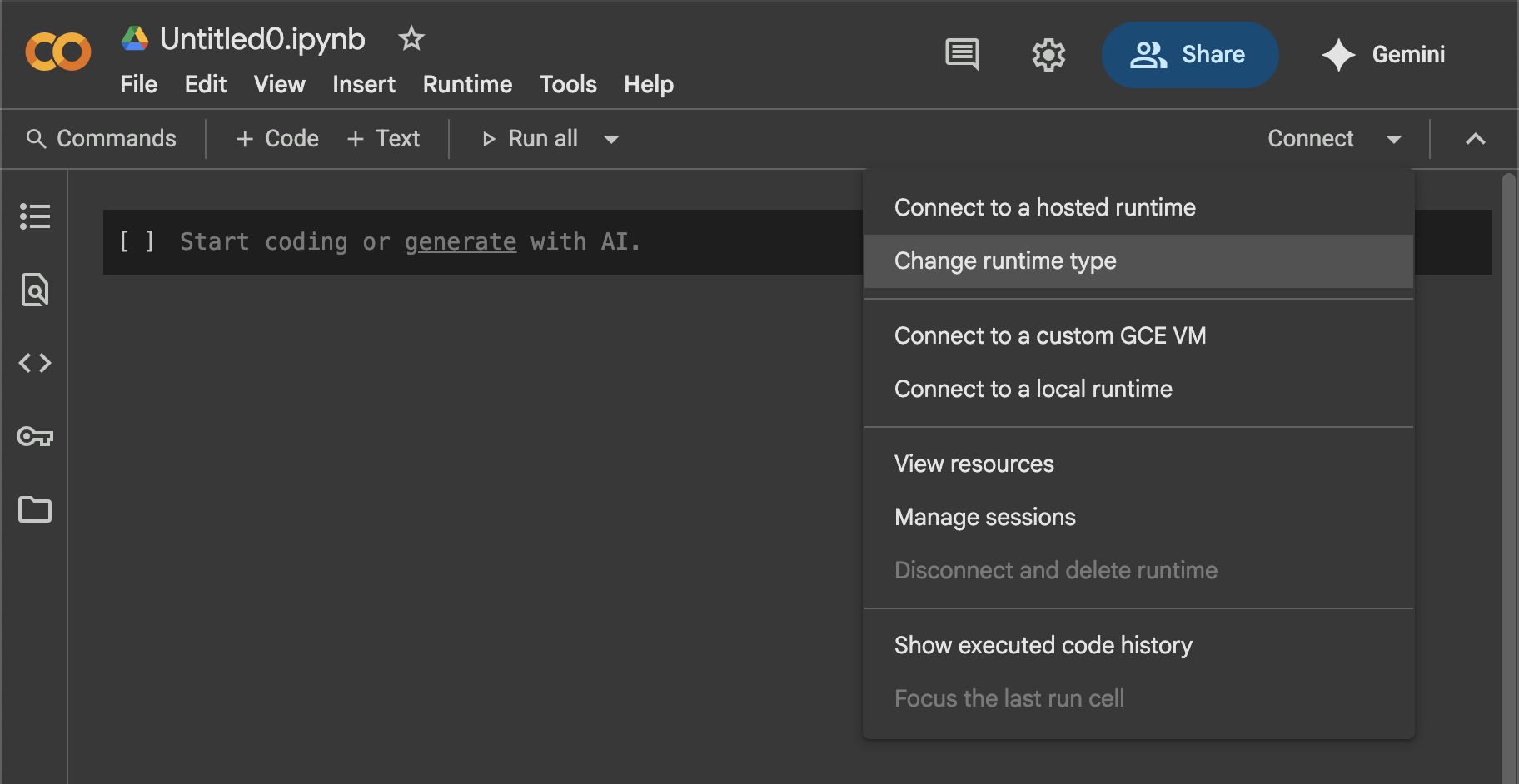
Select any runtime with a GPU or TPU. In my case I selected "T4 GPU".
Colab has a special instruction %%writefile filename which you can put at the beginning of a cell. Such cells, when executed, will write their content in a file named filename.
Create a first cell:
%%writefile cuda_check.cu

#include <stdio.h>
#include <cuda_runtime.h>

int main() {
    int deviceCount;
    cudaGetDeviceCount(&deviceCount);

    if (deviceCount == 0) {
        fprintf(stderr, "No CUDA devices found.\n");
        return 1;
    }

    for (int i = 0; i < deviceCount; ++i) {
        cudaDeviceProp prop;
        cudaGetDeviceProperties(&prop, i);

        printf("# Device %d: %s\n", i, prop.name);
        printf("#   Compute capability: %d.%d\n", prop.major, prop.minor);
        printf("#   Total global memory: %lld MB\n", (long long) prop.totalGlobalMem / (1024 * 1024));
        printf("#   Max threads per block: %d\n", prop.maxThreadsPerBlock);
        printf("#   Max threads per multiprocessor: %d\n", prop.maxThreadsPerMultiProcessor);
        printf("#   Number of multiprocessors: %d\n", prop.multiProcessorCount);
        printf("#   Shared memory per block: %lld KB\n", (long long) prop.sharedMemPerBlock / 1024);
        printf("#   Registers per block: %d\n", prop.regsPerBlock);
        printf("#   Warp size: %d\n", prop.warpSize);
        printf("#   Max block dimensions: [%d, %d, %d]\n", prop.maxThreadsDim[0], prop.maxThreadsDim[1], prop.maxThreadsDim[2]);
        printf("#   Max grid dimensions: [%d, %d, %d]\n\n", prop.maxGridSize[0], prop.maxGridSize[1], prop.maxGridSize[2]);
    }

    return 0;
}
In a second cell, compile and run the file:
!nvcc cuda_check.cu -o cuda_check && ./cuda_check! at the beginning of the line.Run both cells and you should see various GPU specs printed out. You're all set!
Kernels, Threads, Blocks, Grids
A kernel is nothing more but a function that runs on the GPU. CUDA allows you to write those functions in C/C++ and it gives you control over the parallelization.
A thread is like a mini process that runs an instance of your kernel (more on that later), it is ultimately what runs your code. A GPU may have thousands of threads running in parallel.
A block is a collection of threads which have a shared memory space and that you can synchronize if needed (let the threads wait for each other to complete).
A grid is a collection of blocks, however threads in different blocks don't share any memory space and cannot be synchronized.
A kernel always runs in a single grid, but you get to decide how many blocks that grid contains, and how many threads each of those blocks contain.
GPU Specs
Running the code above, I get the following output:
# Device 0: Tesla T4
#   Compute capability: 7.5
#   Total global memory: 15095 MB
#   Max threads per block: 1024
#   Max threads per multiprocessor: 1024
#   Number of multiprocessors: 40
#   Shared memory per block: 48 KB
#   Registers per block: 65536
#   Warp size: 32
#   Max block dimensions: [1024, 1024, 64]
#   Max grid dimensions: [2147483647, 65535, 65535]
Some comments:
Compute capability: 7.5is important: when running kernels later, you'll need to compile the code withnvcc -arch=sm_75. Modify the flag accordingly.Max threads per multiprocessor: 1024refers to the number of Streaming Multiprocessors, or SMs. Those are the GPU cores. A streaming multiprocessor is what picks on up on blocks and runs the threads in them. One SM does not necessarily pick up all blocks of a grid, which is why threads in a single block share memory, but not threads across multiple blocks. This GPU has40multiprocessors that can process1024threads each. That is a total of40,960concurrent threads!Warp size: 32: when a block is executed on an SM, it is divided into warps, and it's the warp that is actually sent to the SM. This GPU has32threads per warp. The warp scheduler is responsible for picking up threads to run, and send them as a warp to the SM. That said, this is more of a hardware detail.- We'll get back to
Max block dimensions: [1024, 1024, 64]andMax grid dimensions: [2147483647, 65535, 65535]later.
For now, the single most important number is Max threads per block: 1024.
Overview
Before we bury our head in the code, I'd like to explain the big picture.
In GPU programming, the kernel (function) we write is going to be called many times by different threads; a single call to the function is expected to process a subset of our problem.
Let's supposed we want to add together two arrays of 1 million elements each. You won't write a loop over 1 million elements directly. Instead, you might design the kernel to process 2 elements per call, and let CUDA call your function 500,000 times. Thus, each call to the kernel must be able to determine which elements to process.
The GPU has its own memory. This means data must be moved/copied to and fro the CPU/GPU. This also means we'll have to deal with pointers to CPU addresses and pointers to GPU addresses, and we must not try to dereference (access) those pointers on the wrong device!
In a nutshell, if we wanted to add 2 arrays on the GPU, we would:
- Allocate and fill the arrays on the CPU
- Allocate memory on the GPU
- Copy the arrays from the CPU to the GPU
- Run the kernel
- Copy the result from the GPU to the CPU
- Free the GPU memory
- Free the CPU memory
Writing A Kernel
We'll now write our first kernel. Let's continue with the example we took earlier, adding two arrays together:
#include <stdio.h>
#include <cuda_runtime.h>

__global__ void add_kernel(float *array1, float *array2, float *result, int size)
{
    int i = blockDim.x * blockIdx.x + threadIdx.x;
    if (i < size) {
        result[i] = array1[i] + array2[i];
    }
}

void add(float *array1, float *array2, float *result, int size)
{
    float *cuda_array1;
    float *cuda_array2;
    float *cuda_result;

    // Allocate memory on GPU
    cudaMalloc(&cuda_array1, sizeof(float) * size);
    cudaMalloc(&cuda_array2, sizeof(float) * size);
    cudaMalloc(&cuda_result, sizeof(float) * size);

    // Copy array1 and array2 from CPU to GPU
    cudaMemcpy(cuda_array1, array1, sizeof(float) * size, cudaMemcpyHostToDevice);
    cudaMemcpy(cuda_array2, array2, sizeof(float) * size, cudaMemcpyHostToDevice);

    // Run the kernel
    dim3 block_dim(size);
    dim3 grid_dim(1);
    add_kernel<<<grid_dim, block_dim>>>(cuda_array1, cuda_array2, cuda_result, size);

    // Wait for the kernel to finish
    cudaDeviceSynchronize();

    // Copy cuda_result from GPU to CPU
    cudaMemcpy(result, cuda_result, sizeof(float) * size, cudaMemcpyDeviceToHost);

    // Free GPU memory
    cudaFree(cuda_array1);
    cudaFree(cuda_array2);
    cudaFree(cuda_result);
}

int main() {
    int size = 1000;
    float *array1 = (float*) malloc(sizeof(float) * size);
    float *array2 = (float*) malloc(sizeof(float) * size);
    float *result = (float*) malloc(sizeof(float) * size);

    for (int i = 0; i < size; i++)
    {
        array1[i] = 2;
        array2[i] = 3;
    }

    add(array1, array2, result, size);

    int errors = 0;
    for (int i = 0; i < size; i++)
    {
        if (result[i] != 5)
        {
            errors++;
        }
    }
    printf("Errors = %d\n", errors);

    free(array1);
    free(array2);
    free(result);
}nvcc -arch=sm_75 main.cu -o main && ./main.There's a lot of boilerplate, but the important bits are the kernel itself and the call to the kernel.
__global__, blockDim, blockIdx, gridDim, <<<...>>> ?First, __global__ is how we define a kernel in CUDA. The function add_kernel will now be executed on the GPU. As I said earlier, the GPU has its own memory which you need to allocate using cudaMalloc (and free using cudaFree) and to which you can copy data with cudaMemcpy. When the data is processed and you want to read it, you need to move it from the GPU back to the CPU. This is most of the boilerplate which I commented.
Kernel Call
dim3 block_dim(size);
dim3 grid_dim(1);
add_kernel<<<grid_dim, block_dim>>>(cuda_array1, cuda_array2, cuda_result, size);
When calling the kernel, we use the CUDA triple chevron syntax <<<...>>>. This syntax takes 2 arguments:
grid_dim: the number of blocks in the grid executing the kernelblock_dim: the number of threads in each of those blocks
Those two variables are of type dim3 which can take 3 arguments (x, y, z). When specifying a single number, it is assigned to x (in that case you could pass an int directly). For now ignore those 3 dimensions, and do as if it was a single number, we will get back to this at the end.
grid_dim rows and block_dim columns, containing the threads that will run the kernel.So here, we are running the kernel on a single block which has size=1000 threads. Note that our GPU has a maximum of 1024 threads per block, so this will fail if size > 1024. We will see how to deal with that later.
Remember that I wrote earlier: a thread executes an instance of your kernel. So add_kernel<<<grid_dim, block_dim>>>(...) will in fact trigger grid_dim * block_dim = 1 * 1000 = 1000 calls to your function, one from each thread.
threadIdx, blockIdx, blockDim
__global__ void add_kernel(float *array1, float *array2, float *result, int size)
{
    int i = blockDim.x * blockIdx.x + threadIdx.x;
    if (i < size) {
        result[i] = array1[i] + array2[i];
    }
}
In the kernel you can see those special variables not declared anywhere. Those are dim3 objects like block_dim and grid_dim, and they are given to us by CUDA. Those variables give us information on which thread is running the kernel instance.
threadIdxis the index of the thread (running the kernel) in the block it belongs toblockIdxis the index of the block (running the thread) in the grid it belongs toblockDimis the number of threads in the block, which is what we passed to the kernel call asblock_dim
(blockIdx, threadIdx) constitutes the (row, col) position in the matrix of the thread running the kernel.This is a representation of the threads running your kernel if you had called it with add_kernel<<<3, 4>>>(...) (3 blocks of 4 threads, so 12 threads in total). Each row represents a block, and each cell in a block is a thread running your kernel.
We can assign a global index to each thread by flattening the grid in row-major order. The thread in position (1, 2) has a flat index of 4 * 1 + 2 = 6.
This is exactly what you see in the kernel code:
int i = blockDim.x * blockIdx.x + threadIdx.x;In our code however, blockDim=1 therefore blockIdx=0, so this simplifies to 1 * 0 + threadIdx = threadIdx.
Why <<<1, 1000>>> or <<<3, 4>>> ?
So this triple chevron syntax is in fact just specifying the size of a matrix (grid). A matrix of threads that will run the kernel.
It depends on the problem. If you have 1000 elements to process, you can use a single block of 1000 threads <<<1, 1000>>>. But remember each block has a limit of 1024 threads. If you wanted to process 2000 elements at once, you would have to split those over 2 blocks. For example by using 2 blocks of 1000 threads <<<2, 1000>>>.
What if we have more threads than elements to process ?
Say you want to process 1049 elements (that's a prime number). The best you can do is start the kernel with <<<2, 525>>>. This will leave a single unused thread (1050 threads vs 1049 elements to process).
Of course, since CUDA doesn't know this thread is unused, it will run regardless. It is your job to make it a no-operation. This is why we have this line in the kernel:
if (i < size) {
    // add arrays
}
What if we have more elements to process than threads ?
As we saw earlier, our GPU has about 40k threads that can run in parallel. How can we process, say, 100k elements? You don't even need to get to that extreme, you might simply want to split the GPU usage across different calculations, so you'll have a certain number of threads allocated to a certain task.
A thread doesn't have to process only a single element, it can process multiple. For example, if the GPU had 1000 threads available and we wanted to process 5000 elements, we could run 1000 threads and have each thread process 5 elements.
A common way to do that is to use a grid-stride loop:
- Thread
0will process elements0, 1000, 2000, 3000, 4000 - Thread
1will process elements1, 1001, 2001, 3001, 4001 - Thread
999will process elements999, 1999, 2999, 3999, 4999
__global__ void add_kernel(float *array1, float *array2, float *result, int size)
{
    int start = blockDim.x * blockIdx.x + threadIdx.x;
    int stride = gridDim.x * blockDim.x;

    for (int i=start; i<size; i+=stride) {
        result[i] = array1[i] + array2[i];
    }
}

// ... for the sake of the example, suppose the maximum block size is 500, so we use 2 thread blocks
add_kernel<<<2, 500>>>(cuda_array1, cuda_array2, cuda_result, 5000);gridDim * blockDim coming from?If you look at the bullet points above, each element processed by a thread is separated by 1000 indices. 1000 is just the number of threads running: gridDim * blockDim = 2 * 500 = 1000.
It is as if each thread was looping around and processing the same element of a new dataset. That is, if we had 1000 elements to process, then thread 0 takes element 0, thread 1 takes element 1, etc. But here we have 4 more groups of 1000 elements to process. Thread 0 will process the first element of each group, which, if you flatten the indices are: 0, 1000, 2000, 3000, 4000.
Grid Dim
So far, we've been setting the grid dimension manually, hopefully you now understand that we can compute it based on the number of elements to process as long as we fix the block size.
For example, if the block size is fixed to block_dim=1024, and we have n elements to process, then we're looking for the smallest grid_dim such that:
For example, if we have 1,000,000 elements to process and we fix block_dim=1024, then grid_dim=ceil(1000000 / 1024) = 977.
Profiling
If you give the compiled binary to the NVIDIA profiler nvprof, it will measure the time it took to execute the kernel, which is super useful to compare performances.
In the Colab cell:
!nvcc -arch=sm_75 main.cu -o main
!nvprof ./main
Will output something like:
==1086== NVPROF is profiling process 1086, command: ./main
Errors = 0
==1086== Profiling application: ./main
==1086== Profiling result:
            Type  Time(%)      Time     Calls       Avg       Min       Max  Name
 GPU activities:   44.98%  3.8720us         1  3.8720us  3.8720us  3.8720us  add_kernel(float*, float*, float*, int)
                   28.25%  2.4320us         2  1.2160us     992ns  1.4400us  [CUDA memcpy HtoD]
                   26.77%  2.3040us         1  2.3040us  2.3040us  2.3040us  [CUDA memcpy DtoH]
      API calls:   99.77%  187.09ms         3  62.363ms  2.9720us  187.08ms  cudaMalloc
                    0.07%  137.48us       114  1.2050us     107ns  53.157us  cuDeviceGetAttribute
                    0.06%  116.14us         3  38.712us  3.4600us  106.42us  cudaFree
                    0.06%  109.43us         1  109.43us  109.43us  109.43us  cudaLaunchKernel
                    0.03%  46.972us         3  15.657us  7.4770us  20.285us  cudaMemcpy
                    0.01%  12.017us         1  12.017us  12.017us  12.017us  cuDeviceGetName
                    0.00%  6.6660us         1  6.6660us  6.6660us  6.6660us  cudaDeviceSynchronize
                    0.00%  6.3690us         1  6.3690us  6.3690us  6.3690us  cuDeviceGetPCIBusId
                    0.00%  1.8510us         3     617ns     144ns  1.3680us  cuDeviceGetCount
                    0.00%     939ns         2     469ns     140ns     799ns  cuDeviceGet
                    0.00%     466ns         1     466ns     466ns     466ns  cuModuleGetLoadingMode
                    0.00%     430ns         1     430ns     430ns     430ns  cuDeviceTotalMem
                    0.00%     257ns         1     257ns     257ns     257ns  cuDeviceGetUuid
You can see the performance of every CUDA library call, and more specifically:
Time(%)      Time     Calls       Avg       Min       Max  Name
 44.98%  3.8720us         1  3.8720us  3.8720us  3.8720us  add_kernel(float*, float*, float*, int)
It took 3 micro seconds to run the add_kernel on 1000 elements.
Now, let's actually bump this number to 1 million and do some profiling!
Summary and Profiling on 1M elements
We can actually use the grid-stride loop version of our kernel for all tests, since this adapts to any number of threads and blocks.
__global__ void add_kernel(float *array1, float *array2, float *result, int size)
{
    int start = blockDim.x * blockIdx.x + threadIdx.x;
    int stride = gridDim.x * blockDim.x;

    for (int i=start; i<size; i+=stride) {
        result[i] = array1[i] + array2[i];
    }
}
I'm building array1 and array2 with int size = 1 << 20, which is approximately 1 million elements.
Sequential ~126ms
add_kernel<<<1, 1>>>(cuda_array1, cuda_array2, cuda_result, size);Profiling this gives us:
Time(%)      Time     Calls       Avg       Min       Max  Name
 97.27%  126.01ms         1  126.01ms  126.01ms  126.01ms  add_kernel(float*, float*, float*, int)
One block ~682us
add_kernel<<<1, 1024>>>(cuda_array1, cuda_array2, cuda_result, size);Profiling gives us:
Time(%)      Time     Calls       Avg       Min       Max  Name
 18.33%  682.84us         1  682.84us  682.84us  682.84us  add_kernel(float*, float*, float*, int)
Multiple blocks ~76us
int block_dim = 1024;
int grid_dim = (size + block_dim - 1) / block_dim;
add_kernel<<<grid_dim, block_dim>>>(cuda_array1, cuda_array2, cuda_result, size);
Profiling gives us:
Time(%)      Time     Calls       Avg       Min       Max  Name
  2.46%  76.127us         1  76.127us  76.127us  76.127us  add_kernel(float*, float*, float*, int)
This runs 1657x faster than doing the sum sequentially!
Dim3
I will conclude this article by explaining why gridDim and blockDim are dim3 objects with x, y, z components.
These are abstractions over the idea of threads and blocks. So far we've used threads and blocks available in the x dimension, but you actually have 2 more to use. You would typically use those if your problem is intrinsically 2d or 3d.
Adding two lists of numbers only requires a single index, so that is 1d. However, processing matrices could be done more naturally with 2 indices (row, column). Everything we've seen in 1d applies in 2d and 3d.
At the beginning of the article we printed out the GPU specs:
#   Max block dimensions: [1024, 1024, 64]
#   Max grid dimensions: [2147483647, 65535, 65535]
Those three numbers correspond to the limits for the x, y, z dimensions. There are 2 important considerations:
- Total threads per block. We saw the limit was 1024; this limit applies across dimensions. Meaning you can use
[32, 32, 1]threads forx, y, zand that would be a valid configuration since32 * 32 * 1 = 1024which does not exceed the limit. On the other hand[32, 32, 32]is invalid. - Per-dimension limit. Each of
x, y, zmust not contain more threads than the individual limits[1024, 1024, 64]. For example[1025, 0, 0]is invalid.
Download the Google Colab notebook I used and import it into your own account for testing!
